

How to Check Backlinks Manually (yes, Without a Damn Tool)
Listen to this article
Browser-native voice. No account required.
Wondering how to check backlinks manually? Good. Because while everyone's busy worshipping overpriced SEO tools, you're about to learn how to do it the real way - eyes on source code, fingers on keyboard, no AI fluff or fake numbers. If there's a backlink out there pointing to your site (or your competitor’s), this is how you actually find it.
Tl;dr (for the Lazy)
Go to any webpage you think might link to you.
Right-click → View Source (or hit Ctrl+U / Cmd+U).
Ctrl+F for your domain or full URL.
Find <a href="yourdomain.com"> tags.
Check if it’s dofollow or nofollow.
Bonus: Use Google Search Console for your own site to pull backlink data.
Don’t rely on tools alone - manual checks expose junk links, anchor weirdness, and shady domains.
What’s a Backlink and Why Should You Care?
A backlink is just a link from someone else’s site to yours. It’s how the internet votes for content. Google sees those votes, counts them (sometimes), and adjusts your rankings accordingly.
Problem? Not all backlinks are good. Some are garbage. Some are fake. Some are nofollow. And if you think your shiny link checker catches them all, think again.
This is where manual backlink checking comes in. You get your hands dirty. You see the HTML. You stop being lied to by half-baked reports.
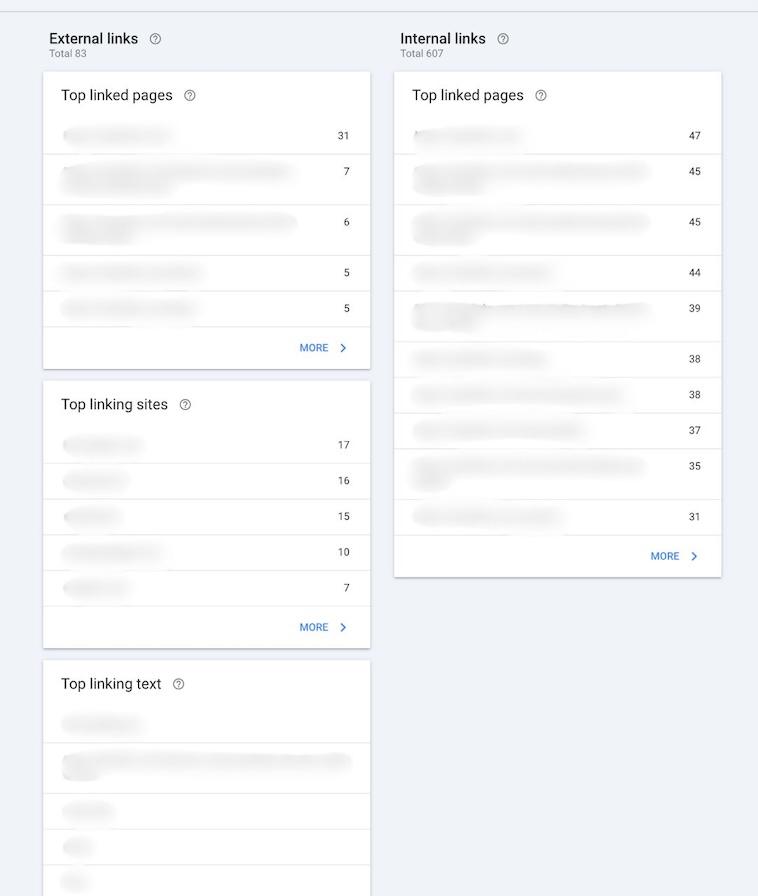
Method #1: Google Search Console (for Your Own Site)
Alright, let’s be fair. If you own the site, you don’t have to go full hacker-mode. Google gives you backlink data on a silver platter.
Here’s how to find it:
Go to Google Search Console.
Click your verified website property.
In the left menu, hit Links.
Under External Links, you’ll see: Top linked pages (on your site) Top linking sites (external domains) Top linking text (aka anchor text)
Click More to expand. Export to CSV or Google Sheets. Congrats, you’re now looking at your real backlink profile minus the shady stuff Google doesn’t bother showing.
Google doesn’t show every backlink. Just the ones it thinks matter. Translation? You're blind to a lot of your link profile unless you go deeper.
Method #2: Manual Backlink Check (the Old School Way)
Want to actually see the backlink on the page? Welcome to the world of view-source glory. It’s not fancy. It is effective.
Step-By-Step: Manual Backlink Hunting
Step 1: Pick a Page to Check
Your page. A competitor’s page. A sketchy blog that supposedly links to you. Whatever.
Step 2: View the Source Code
Right-click → View Page Source
Or hit Ctrl+U (Windows) or Cmd+U (Mac)
Step 3: Search for Your Domain
Hit Ctrl+F or Cmd+F. Type your domain (e.g. yourdomain.com). Boom. Browser jumps to every instance of your URL in the source code.
Step 4: Spot the Link Tag
You’re looking for this guy:
<a href="https://yourdomain.com/page">Some anchor text</a>
Now read around it.
Is the anchor text relevant?
Is it surrounded by spammy gibberish?
Is it buried in a comment or hidden div?
Step 5: Check the rel Attribute
Does it look like this?
<a href="https://yourdomain.com" rel="nofollow">Anchor</a>
Then it’s a nofollow link. That means Google might ignore it. Or not. Depends on the weather in Mountain View.
Is there no rel attribute? Congrats, it’s likely dofollow. That’s the good stuff.
But Wait, What About JavaScript Links?
You’re not wrong. Some links don’t show up in plain HTML. They’re injected via JavaScript. If that’s the case, open Developer Tools (right-click → Inspect Element), go to the Elements tab, and start digging.
Or just accept your fate and move on. Ain’t nobody got time for a React-rendered mess unless you're an SEO masochist.
What This Manual Check Actually Tells You
Whether the link exists (you’d be shocked how many don’t).
Whether it’s nofollow or dofollow.
The anchor text.
The context (is it in content? footer? sidebar?)
The quality of the page it lives on.
Whether it's spammy, shady, or pure gold.
And that’s stuff tools often fudge or ignore.
Common Screw-Ups
Thinking a mention is a backlink. It’s not. No <a href> = no link juice.
Believing all links are equal. They’re not. A spammy forum profile ≠ a link from HubSpot.
Ignoring rel attributes. Sponsored, UGC, and nofollow all change everything.
Using only one tool. There’s no one source of truth. Not even Google.
Blindly trusting GSC. It shows some links. Not all. And never your competitor’s.
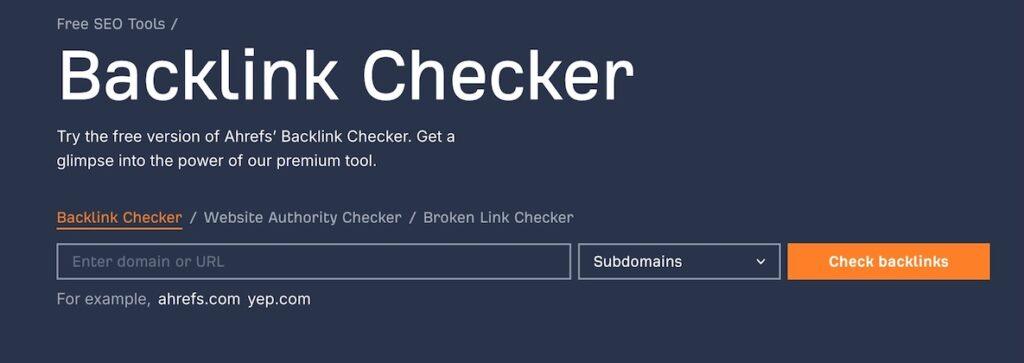
Ahrefs Free Backlink Checker (because Free Still Beats Blind)
Alright, if you’re not ready to crawl page source like a goblin, there’s a middle ground. It’s called the Ahrefs Free Backlink Checker. No account, no credit card, no nonsense.
What You Get (for Free)
Top 100 backlinks to any domain or URL
Anchor text and target page
Whether it’s dofollow or nofollow
Domain Rating (DR) of the linking site
You don’t get full link profiles, historical data, or spam alerts. But guess what? You do get enough to sniff out:
Who’s linking to your content
How they’re linking (anchor text, follow status)
Whether you should build more links like it—or nuke the page entirely
When to Use It
Quick check on your own site
Spot-check competitors
Verify if a guest post or PR hit actually got you a link (and not just a mention)
Is it as deep as the full Ahrefs suite? Of course not. But it’s free. And in this savage world of SEO, a free scout is better than no scout at all.
FAQ: Real Questions from Real (frustrated) SEOs
Can I check competitor backlinks manually?
Yes. Same method. Pick a page, view source, search for links going to your competitor. Don’t be lazy.
What is a dofollow link?
Any link that doesn’t have a rel="nofollow" or other blocking attribute. It's the one that (probably) passes SEO value.
Why doesn’t Google Search Console show all my backlinks?
Because Google only shows what it wants. Usually the links it trusts. The rest? You’re on your own.
How often should I check backlinks?
Once a month, minimum. Weekly if you’re in a competitive niche or just paranoid (like the rest of us).
Bart Magera
Founder of Mojo Links. 10+ years in SEO across YMYL verticals.
Related posts
Keep reading on adjacent topics.

The Perfect Backlink Audit Guide - Do It the Right Way
Think your backlinks are helping you? Prove it. Most websites are sitting on a pile of link rot. Old junk. Toxic links. Stuff search engines side-eye while tanking your search rankings behind the scenes. This backlink audit guide is not a theory lesson. It’s your hands-on…

Link Building Statistics 2025: 50 Data Points SEOs Can’t Ignore (unless They Want to Stay Broke)
Forget what some AI bro told you in a Discord.Backlinks still matter. They always did. Despite Google’s PR spin about "great content" and "helpful updates," every serious SEO knows the game runs on links. Real links. From real sites. With real authority. The difference now? It’s…
Guest Posts vs Niche Edits: Which Link Building Strategy Wins in 2025?
TL;DR Guest posting and niche edits are both effective link building tactics. One gives you full control and brand authority. The other taps into existing content for fast backlinks. Which one’s better? It depends on your SEO goals, timeline, and resources. If done right, both…
Want this kind of analysis on your site?
Get a free video walkthrough within 48 hours covering technical health, backlinks, content gaps, and AI visibility.